AI TOOL / #02062
Octo
An AI-driven analysis tool designed for Google Sheets, which utilizes natural language processing.
Introduction
AI-powered analytics tool for Google Sheets using natural language.
What is the Octo AI Chrome extension/plug-in?
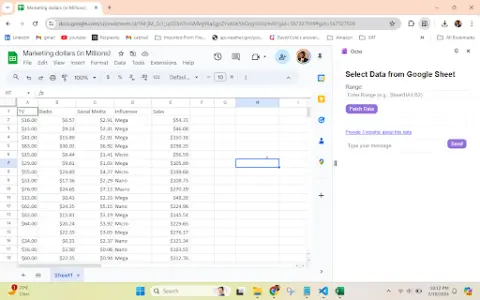
Octo is an AI-powered analysis tool designed to simplify data analysis within Google Sheets. It enables users to analyze data using natural language processing, providing immediate insights right within the Google Sheets interface without the need to leave that environment. Octo supports a wide range of data types, including marketing, product, and financial information, making data analysis more convenient and efficient.
How to use the Octo AI Chrome extension/plug-in?
1. Enter the data range for the table in the format specified in the example (for instance, copy the range from the inserted pivot table).
2. Click “Retrieve Data”.
3. Begin asking questions to analyze the data (for example, “What are the key insights that can be derived from this data?”).
The core functions of the Octo AI Chrome extension/plugin
Performing natural language data analysis in Google Sheets
AI-driven insight generation
User-friendly sidebar interface
Supports multiple data types, including marketing, product, and financial information.
Related
LightReel
UGC Marketing Material Research Tool
Document Metadata Clearing (PixPix)
DOCX/PDF property cleanup
ByteCP
AI Office Intelligent Agent Client
updream
Professional AI Video Creation Platform
PDF merging (PixPix)
Merging and sorting multiple documents
Photo Stitching (PixPix)
Combine multiple images into a long image grid