AI TOOL / #03900
AiAsk Summary
A Chrome extension tool that extracts article outlines to improve reading and research efficiency.
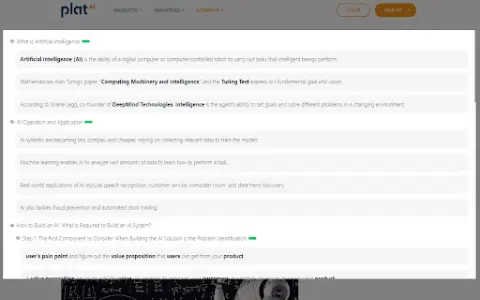
Introduction
Chrome extension that extracts outlines from articles for enhanced reading and research.
What is the AiAsk Summary AI Chrome extension/plugin?
AiAsk Summary is a Chrome extension designed to enhance your reading and research experience. It cleverly extracts the main outline of any article you browse, providing a structured overview of its content.
How do I use the AiAsk Summary AI Chrome extension/plugin?
1. Browse: Open any article in the Chrome browser.
2. Activate: Click the icon in the browser toolbar or the icon on the right side of the page.
3. Extract: This extension analyzes the article and displays a concise outline.
Core features of the AiAsk Summary AI Chrome extension/plugin
Automatic outline generation
User-friendly interface
Improve reading efficiency
Supports YouTube videos
Show detailed content when the outline is ready.
Related
Mobicip
Parental control software designed to manage screen time and ensure online safety.
Novus
AI-powered browser extension to identify potential scams.
MyDetectAi
AI detection tools used to identify deeply forged videos, images, audio files, and text.
NoPlagio
Online Plagiarism Detection and Prevention Platform.
Noodle4 AI – Content review assistant.
Noodle4 is an AI platform for content moderation and review, ensuring consistency with the brief.
Leminda AI fake-checker
An AI-powered Chrome extension designed to detect fake news and fraudulent information.