AI TOOL / #04132
ChatGPT Rewriter
Chrome extensions are used to rewrite text or to submit questions using ChatGPT.
Introduction
Chrome extension to rewrite text or ask questions using ChatGPT.
What is the ChatGPT Rewriter AI Chrome extension/plug-in?
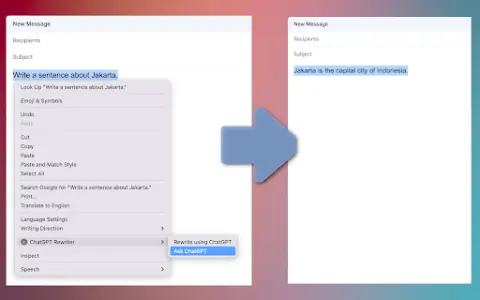
This Chrome extension enables you to use ChatGPT to enhance and refine your text. It allows users to directly rewrite selected text within the browser or submit questions to ChatGPT.
How to use the ChatGPT Rewriter AI Chrome extension/plug-in?
1. Select any editable text in your browser.
2. Look for the option to use the ChatGPT rewriting tool.
3. If you wish to rewrite the text, please select "Rewrite using ChatGPT".
4. If you have any questions, please choose "Ask ChatGPT".
5. The answer will replace your original text.
During text processing, a loading indicator will appear in the upper right corner of the page.
To use this extension, you must have a ChatGPT account. Once your account is set up, the extension will guide you through the process of generating and configuring your API key.
The core functions of the ChatGPT Rewriter AI Chrome extension/plug-in
Use ChatGPT to rewrite the selected text.
Ask ChatGPT questions directly from your browser.
Guidelines for API Key Configuration
Related
Relay
When sending a document, include the background image as well. Pass it along to the other party’s AI system together with the rest of the content.
Mister Blocks
Take a photo of the building blocks, and a assembly plan will be generated automatically.
Project64
The most classic Nintendo 64 emulator, featuring excellent compatibility and support for high-definition texture packs as well as widescreen patches. It is the ideal choice for playing games like “The Legend of Zelda: Ocarina of Time” and “Super Mario 64”.
MAME
The “bible” of arcade emulators, officially named Multiple Arcade Machine Emulator. This software is dedicated to replicating the hardware of arcade game systems within a software environment. It has been in active development since its release in 1997 and remains so to this day.
OpenEmu
A multi-platform emulator with a beautiful interface and intuitive operation – it supports dozens of different systems including FC, SFC, GB, GBA, N64, PS1, and more, making it the ideal choice for Mac users.
Nod
The open-source personal assistant intelligent agent developed by n8n