AI TOOL / #04236
DeepSeek AI
An AI-powered tool for analyzing web content and providing answers.
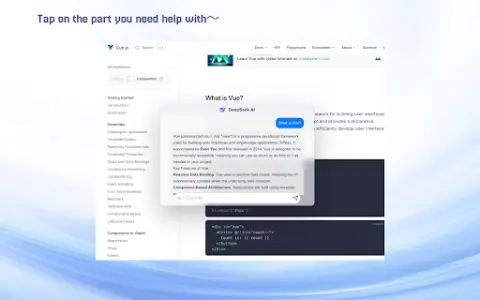
Introduction
AI-powered tool for web content analysis and answering.
What is the DeepSeek AI Chrome extension/plug-in?
DeepSeek is an AI-powered tool designed to provide users with intuitive and efficient capabilities for analyzing web content and obtaining answers. By selecting text from a webpage, users can leverage DeepSeek’s advanced AI models to obtain in-depth analyses and relevant information.
How to use the DeepSeek AI Chrome extension/plug-in?
1. Install the DeepSeek extension from the Chrome Web Store.
2. Enter your API key to activate the custom AI service.
3. Select the text on the web page, right-click on it, and choose DeepSeek to obtain intelligent answers.
The core functions of the DeepSeek AI Chrome extension/plug-in
Intelligent responses to the text on the selected web page
Customize API integration to enable personalized AI services.
Multi-language support
User-friendly interface
Protect privacy through local data processing.
Related
TextGo AI
AI humanizer tool that rewrites AI text to avoid detection and ensure originality.
Paraphrasingtool.ai
A free AI-powered tool that allows users to rewrite text in various modes and with different tones.
Humanize AI
An AI-based tool that transforms AI-generated text into content that resembles human-written work and is free from plagiarism.
AI Bypasser AI
An AI detection removal tool for rewriting AI text and bypassing AI detection.
CAPTCHA Solver: auto hCAPTCHA reCAPTCHA freely
Chrome extension that automatically solves hCaptcha and reCAPTCHA challenges.
NopeCHA
Automated CAPTCHA solutions powered by AI allow you to bypass CAPTCHAs quickly and reliably.