AI TOOL / #05433
OpenAI expenses checker
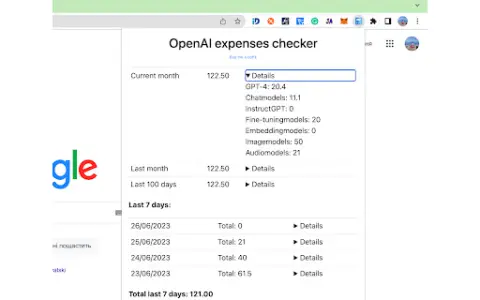
A Chrome extension that allows you to quickly check your OpenAI fees in your browser.
Introduction
Chrome extension for quickly checking OpenAI expenses directly in your browser.
What is the OpenAI Expenses Checker Chrome extension/plug-in?
The “OpenAI Fee Checker” Chrome extension offers a faster and more convenient way to keep track of your OpenAI costs. With this extension, you can directly access the fee-tracking functionality within your browser, saving time and eliminating the need to visit a separate website. It features a user-friendly interface that seamlessly integrates with your browser, and provides real-time updates and notifications, making cost management much simpler and more efficient.
How to use the OpenAI Expenses Checker Chrome extension/plug-in?
Install the “OpenAI Fee Checker” Chrome extension from the Chrome Web Store. Once installed, you will be able to check your OpenAI fees directly within your browser, without having to visit a separate website.
The core functionality of the OpenAI Expenses Checker AI Chrome extension/plug-in
Directly track expenses within the Chrome browser.
A simplified interface that facilitates quick and easy access.
Real-time updates and notifications
Related
Amurex
Open-source AI: unified work processes that connect knowledge and automate tasks.
Convictional
A platform designed for context-based decision-making, collaboration, and goal alignment, utilizing AI technology.
GasbyAI
An AI chat platform with copywriting, programming and image generation capabilities.
Taped.ai
Artificial intelligence tools used to transcribe and summarize audio, images, and text into organized notes.
YouTube Transcript to AI
An AI-powered YouTube extension for transcripts, AI integration, and enhanced learning.
Hellooo for Chrome
A Chrome extension designed to record, transcribe, and analyze user interviews within Google Meet.