AI TOOL / #05444
OpenAI Usage Insights (For Developers)
Chrome extension for efficient monitoring and analysis of OpenAI usage data.
Introduction
Chrome extension to monitor and analyze OpenAI usage data effectively.
What is the OpenAI Usage Insights ai chrome extension/plugin?
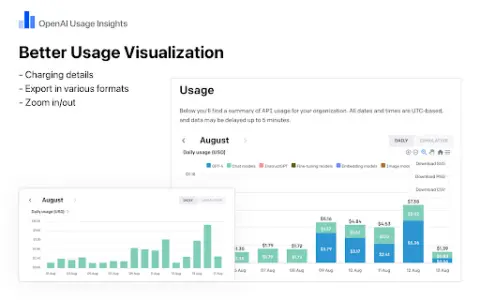
OpenAI Usage Insights is a Chrome extension designed to provide deeper visualization of OpenAI usage. It allows users to effectively monitor and analyze their usage data, providing a comprehensive overview of each model's monthly costs through intuitive stacked charts. The extension also supports seamless export of monthly usage data for further analysis and recording, ensuring a safe and reliable usage experience.
How to use OpenAI Usage Insights ai chrome extension/plugin?
1. Install OpenAI Usage Insights from the Chrome Web Store and ensure it is enabled.
2. Navigate to https://platform.openai.com/account/usage and log in to access the usage dashboard.
3. Optimized charts will appear seamlessly on your screen, allowing you to drill down into specific data or export it.
OpenAI Usage Insights ai chrome extension/plugin core functionality
Get a comprehensive overview of each model's monthly costs with stacked charts.
Seamlessly export and save monthly usage data for further analysis and documentation.
Related
Magic eraser
Magic Eraser – A magical eraser that allows you to remove unwanted elements from images in just a few seconds. For example, if other people appear in your landscape photo, you can use this tool to eliminate them. The resulting image is shown below. Currently, this tool is available on this website.
Taobao and JD.com Special Offer Group
Taobao, JD.com, and PDD exclusive discount group: Scan the QR code to join this group and receive the latest, most comprehensive discount information from Taobao and JD.com every day. We also share various tips on bulk purchases, price loopholes, amazing deals, and brand promotions! Scan the code to join now.
OfficePlus
OfficePlus is a website provided by Microsoft that offers PPT templates, Word documents, Excel charts, and various other template resources. All of these resources are completely free to download and use, without any hidden requirements or fees! The site includes business and academic PPT templates, job application resumes, commonly used documents, and financial reports.
Academic Search
Chongbuluo Academic Search, produced by the Chongbuluo community, integrates 21 academic resource indexing sites, making it easier for you to search academic resources across different academic websites.
Screen defect detection
Want to know if there are any defects in your screen? Conduct an online inspection of your monitor! The testing services available on this website include: solid color tests, light leakage checks, interference tests, focus verification, “breathing effect” analysis, contrast measurement, gamma setting evaluation, and saturation testing. With these tools, you can comprehensively assess the quality and performance of your monitor.
New SpeakON
AI voice input and assistant on the iPhone