AI TOOL / #06171
Patsa – AI-powered Meeting Copilot
A Chrome extension that enables real-time transcription and AI-powered Q&A during online meetings.
Introduction
Chrome extension for real-time transcription and AI-powered Q&A during online meetings.
What is the Patsa AI Chrome extension/plugin?
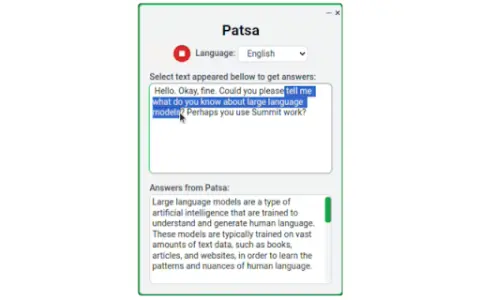
Patsa is a Chrome browser extension designed to enhance online meetings on platforms such as Google Meet, Zoom, and Teams. It transcribes other participants’ speech in real time and lets users select transcribed text to ask AI questions, providing instant information and answers.
How do I use the Patsa AI Chrome extension/plugin?
1) Launch the Patsa extension in any online meeting in Chrome. 2) Click the "Start Transcribing" button to transcribe what the other participants are saying. 3) Select the transcript text you want to ask the AI about, and you'll receive an instant response from the AI.
Core features of the Patsa AI Chrome extension/plugin
Real-time transcription of participants’ speech
AI Q&A based on transcribed text
Related
Rool
Private AI cloud hosting services located within the European Union
Dawnwood
An AI production workshop that generates 10 episodes of vertical-format short dramas based on a single premise
Polylane
An AI operations and maintenance agent that takes over the duties of engineers on their behalf
Proofsource
A platform that monitors and optimizes a brand's visibility in AI-based search results.
ImageBlaster
An online tool that allows users to create images that can be used to navigate a 3D world
Knocket
A free customer service and internal communication tool provided by Tencent Cloud.