AI TOOL / #06688
Vocha | Voice for ChatGPT
Vocha is a voice input extension specifically designed for ChatGPT, with an emphasis on privacy and ease of use.
Introduction
Vocha is a voice-typing extension for ChatGPT with a focus on privacy and ease of use.
What is the Vocha AI Chrome extension/plug-in?
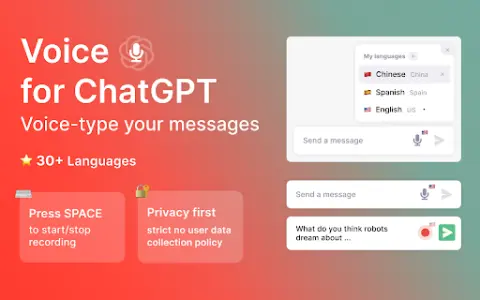
Vocha is a browser extension that allows users to input messages for ChatGPT via voice. It adds a microphone button to the message input field, which can be activated by using the SPACE key or by clicking on it. Vocha places great emphasis on user privacy, strictly adheres to policies that prohibit the collection of user data, and features a clean, minimalist design that ensures seamless integration with the ChatGPT interface.
How to use the Vocha AI Chrome extension/plug-in?
After installing the Vocha extension, a microphone button will appear in the ChatGPT message input box. You can press the SPACE shortcut key or click the microphone button to start and stop recording. You can change the language used for speech recognition by clicking on the flag icon. Remember to grant the microphone access permission during the installation process.
The core functions of the Vocha for Chrome extension/plugin
Provide voice input for messages sent via ChatGPT.
The SPACE shortcut key is used to start/stop recording.
Supports multiple languages (over 30 different languages).
Message editing options (send, edit, or continue recording)
Related
Quick OCR Chatbot Connector (Free)
A Chrome extension that enables fast and accurate image-to-text conversion, featuring integration with chat bots as well as text-to-speech functionality.
Image to Text Converter IO
Online tools that use OCR technology to extract editable text from images.
Say Anything: Prompt Segment Anything Model
Meta AI’s image segmentation model is suitable for a wide range of object masking and recognition tasks.
SynthAnswer AI
An AI extension that provides immediate answers based on screenshots.
EaseQuiz
An AI-driven question-answering generator created from text, images, or PDF files, primarily designed for educators and students.
Joint Angels
A free tool that helps clinicians measure joint range of motion and perform movement analysis.