AI TOOL / #07466
Reverse image search by Copyseeker
Copyseeker image search offers advanced image-search capabilities with just a simple right-click operation.
Introduction
Copyseeker Image Search provides advanced image search capabilities through a simple right-click.
What is the Copyseeker Image Search AI Chrome extension/plug-in?
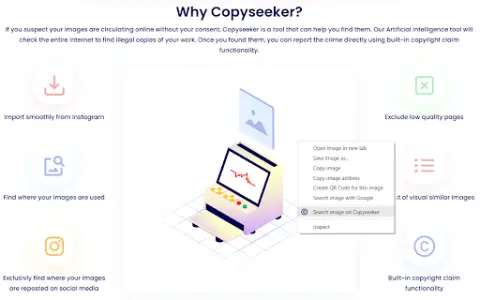
Copyseeker Image Search is a tool designed to enhance the browsing experience by offering advanced image-search capabilities. Users can right-click on any image and select “Search for this image in Copyseeker” to have the image analyzed and obtain detailed information about it.
How to use the Copyseeker Image Search AI Chrome extension/plug-in?
When browsing web pages, right-click on any image and select the option “Search for this image on Copyseeker”. Afterwards, Copyseeker will analyze the image and provide detailed information regarding it.
The core functionality of the Copyseeker Image Search AI Chrome extension/plug-in
Search for images with just one right-click.
Advanced Image Analysis
Fast and efficient results
Privacy-conscious image search
Related
Tangia
Interactive live streaming tools enhance the sense of engagement in conversations by providing features such as custom TTS and reminders.
sceneXtras
SceneXtras is a GPT-enhanced streaming companion for chatting with AI characters.
Superchat – AI Virtual Chat
AI chat applications enable users to connect with experts, historical figures, and fictional characters.
CallStar
An AI voice call platform that enables conversations between users and AI characters as well as famous individuals.
Hello History: AI ChatBot
An application based on artificial intelligence, designed for engaging in conversations with historical figures.
CharGen
An AI-powered fantasy art generator specifically designed for creating characters and worlds in TTRPGs and D&D.